
Using Facebook Comments With Your Events
 A tutorial is now available in the Zap Calendar support web page detailing how you can create a Facebook comment box for events on your website. The procedure described works for ALL versions of Zap Calendar and does not require any additional add-ons. Click here to read the tutorial.
Enhanced Google Maps Plugin, ICal Subscribe Changes, New Plugin Released
 Several enhancements have recently been made to Zap Calendar. This includes an enhancement to the Google Maps plugin, changes to the iCal Subscribe plugin and a new plugin for Zap Calendar Pro users.
Read more: Enhanced Google Maps Plugin, ICal Subscribe Changes, New Plugin Released
New Google Maps Plugin Supports Category Icons, HTML5 User Location
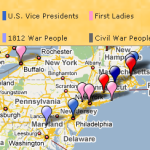 The production release of Zap Calendar 3.0 may have been only a few weeks ago, but we already have a beta release available of version 3.1 of the Google Maps plugin. Available to current Zap Calendar Standard and Pro subscribers, the Google Maps plugin adds mapping capabiltiies to your calendars. This beta 3.1 release contains the following new features:
- Support for Google Maps API v3 (plugin version 3.0 and below uses API v2)
- Use of category icons in the map
- Use of HTML 5's location feature to automatically locate website visitor and display nearby events
Read more: New Google Maps Plugin Supports Category Icons, HTML5 User Location
New Zap Calender Demo Site Now Live
The Zap Calendar demonstration site, ZapCalendar.com, recently underwent a facelift and has been upgraded to run the latest versions of Zap Calendar and Joomla. The site is now live and visitors can test drive the site with the next generation of calendar and CMS software, Zap Calendar 3.0 and Joomla 2.5. Also, a new Joomla 2.5 template, the Clarion template from Rocket Theme, was used for the site. The new site demonstrates Zap Calendar running under Rocket Theme's Gantry Framework, a popular template framework used by many sites. Many of the add-ons for Zap Calendar are also demonstrated on the site.
From the site, you can display several different calendars, view events by location, comment or RSVP to existing events, and even add new events (all postings are still removed automatically after 48 hours). The back end screenshots for Zap Calendar 3.0 and Joomla 2.5 are now available too. You can also purchase Zap Calendar from the site. Try it out and let us know if you find any problem areas. Thanks!