
Zap Calendar 3.0 Reaches Production Status
 After 10 beta releases and 2 release candidates, Zap Calendar 3.0 has reached production status. Zap Calendar 3.0 supports Joomla versions 1.5, 1.6, 1.7 and the just released 2.5 version. It is available now to all current subscribers.
Zap Calendar 3.0 supports Joomla's ACL feature with Joomla versions 1.6 and above. It also comes with 3 new addons. The password plugin (standard and pro versions) provides a simple mechanism for requiring a password when adding or editing events to a calendar in the front-end. This is a simple alternative to creating ACL rules in Joomla 1.6 and above or Joomla 1.5 sites where ACL support is not available.
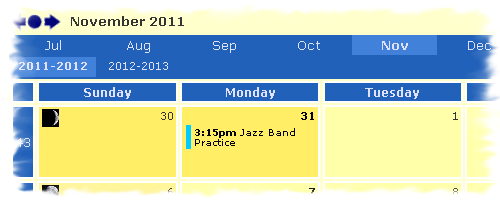
The month header plugin (standard and pro versions) provides one click access to any month in the current year. All month names are displayed in a horizontal line above the calendar for easy navigation between months. This plugin supports calendars starting on months other than January ( a school calendar, for example).
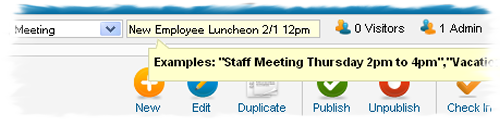
The quick event module (all versions) provides a quick method of adding events from anywhere in the back-end. This module allows a user to create an event by just typing a sentence. Meeting or all day events can be created, and a new enhancement allows the ability to create multi-day events as well as include start and end times. The quick add feature has also been enhanced to allow for European style dates (i.e. "1.27" for January 27). For example, the following sentences can be used to create a new event:
Staff Meeting Wednesday 2pm
Staff Retreat Thursday to Friday
Holiday Office Party 12/23 5pm to 7pm
If only one time is specified, then a one hour meeting is assumed. If no time is specified, then an all day meeting is assumed. Events can also be created using the quick add feature found in Zap Calendar's back-end panel display.
Other highlights of Zap Calendar 3.0 include:
- Over 2 dozen addons available
- PHP 5.3 support
- Updated Photo Header plugin - You can now click on the photo to browse from month to month, similar to clicking on photos in Facebook to display the previous or next photo.
Zap Calendar 3.0 is now available for download to Zap Calendar subscribers at http://www.zcontent.net/zapstore . Has your subscription expired? No problem, just follow the same link, login to your account and renew your subscription.
Zap Calendar 3.0 Reaches Release Candidate Status
After 10 beta releases, Zap Calendar 3.0 has finally reached the "Release Candidate" status. This is the final phase before the product production status. This release fixes numerous issues, include PHP 5.3 compatibility issues with several plugins. Zap Calendar 3.0 supports Joomla versions 1.5, 1.6, 1.7 and the just released 2.5 version. It is available now to all current subscribers.
This release includes the new password plugin, available to standard and pro subscriptions. This plugin provides a simple mechanism for requiring a password when adding or editing events on a calendar in the front-end. This is a simpler alternative to creating ACL rules in Joomla 1.6+ or for Joomla 1.5 sites where ACL support is not available.
This release also expands the quick add event feature, found in Zap Calendar's back-end panel display. This feature allows a user to create an event by just typing a sentence. Meeting or all day events can be created, and a new enhancement allows the ability to create multi-day events as well as include start and end times. The quick add feature has also been enhanced to allow for European style dates (i.e. "1.27" for January 27). For example, the following sentences can be used to create a new event:
Staff Meeting Wednesday 2pm
Staff Retreat Thursday to Friday
Holiday Office Party 12/23 5pm to 7pm
If only one time is specified, then a one hour meeting is assumed. If no time is specified, then an all day meeting is assumed.
New Zap Calendar 3.0 Beta Introduces ACL Support
Access Control List configuration is now supported starting with the beta 9 release of Zap Calendar 3.0. Access Control Lists, also known as ACL's, provide additional fine-tuning of permission settings within the Zap Calendar configuration. This feature is supported with Joomla versions 1.6 and above (Zap Calendar 3.0 will work with Joomla 1.5 but it does not support ACL's). Here are just a few examples of what can be done with the ACL feature in Zap Calendar:
- Create an event manager who can create and manage events but can not create or manage articles.
- Create a special group of users who can create and/or edit events from the front-end.
- Allow additional back-end users to maintain categories, locations and views.
- Provide multiple access levels for front-end groups ( i.e. add and delete, add-only, add, edit and delete, etc).
Beta 9 is now available for download to Zap Calendar subscribers at http://www.zcontent.net/zapstore . Zap Calendar users can renew or upgrade their subscription of Zap Calendar at the same link.
Joomla 1.6 and 1.7 Support Now Available For Zap Calendar
We are pleased to announce the availability of the third beta release of version 3.0 of Zap Calendar. This release provides support for three versions of Joomla: versions 1.5, 1.6 and 1.7. It is available to all current Zap Calendar subscribers, which can be downloaded from the My ZApps page at the Zap Store on the Z Content website.
This is a beta release and has not been extensively tested. You should test the product in your environment to see if the beta version is suitable in your production site. Any issues found with this beta release should be posted to the Zap Calendar forum at the Z Content website.
Highlights of this beta release include:
Read more: Joomla 1.6 and 1.7 Support Now Available For Zap Calendar
Zap Calendar Release 2.2
What 3 Words Best Describe the Latest Version of Zap Calendar?
... Location, location, location!
OK, that is a variation of a bad joke, but it does highlight the major feature of version 2.2 of Zap Calendar, which is expected to be released in April. The new location feature in 2.2 will allow you to group events by location and display a calendar of only those events at that location. By using Zap Calendar's powerful calendar view feature, you can choose what type of calendar to display for a location: monthly, weekly, upcoming and more. iCal and CSV imports make it easy to associate events to locations automatically by matching events with the same location text.
What else is new in version 2.2?
Many of the new features in version 2.2 were suggested by customers. In addition to location support, version 2.2 contains the following new features: